SAP AI + SAP Fiori Design System, POC

AI-Powered Field Support

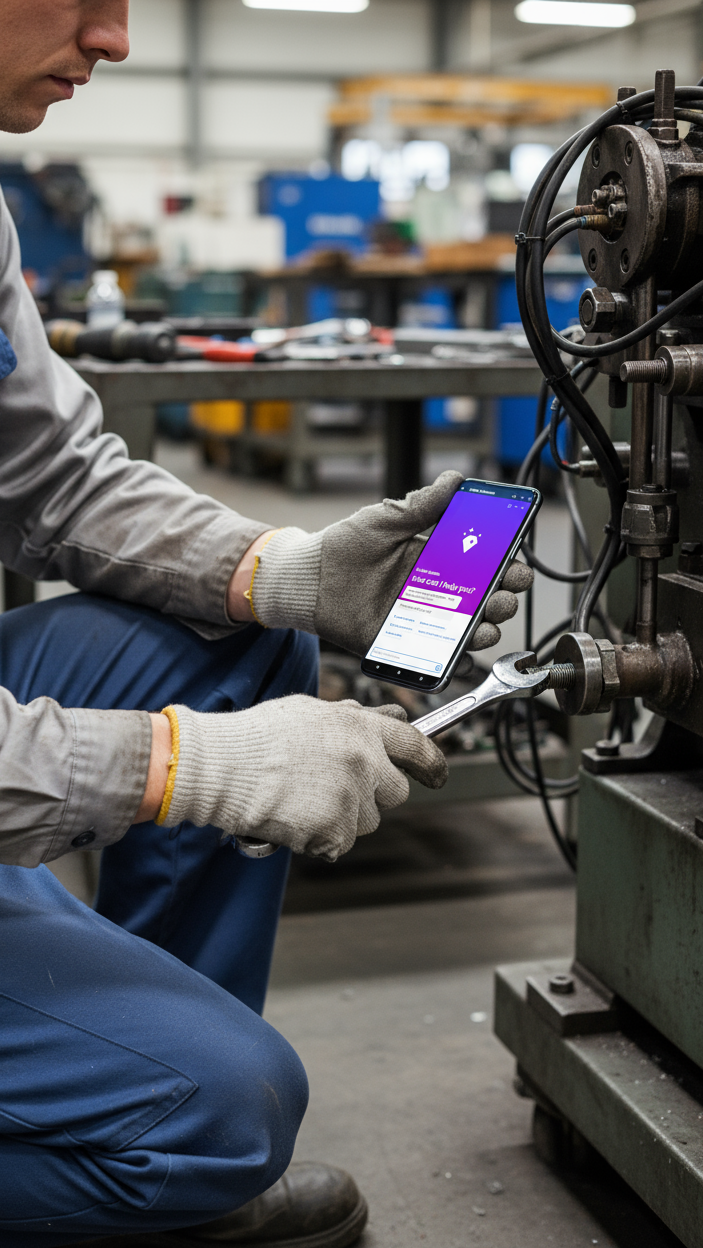
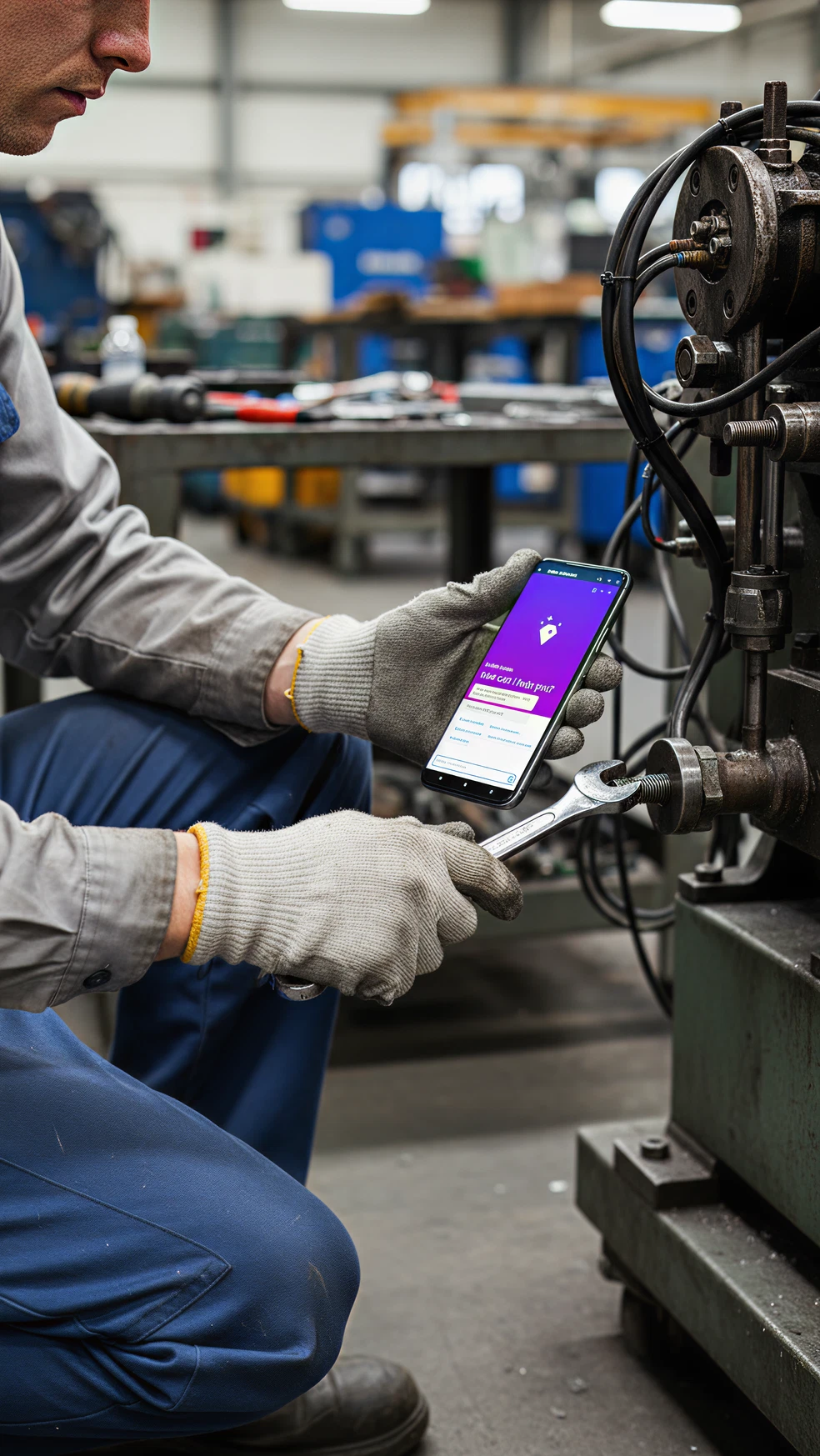
This project was developed as a Proof of Concept to explore how SAP AI could support field technicians in diagnosing and repairing equipment. The design applied SAP Fiori Design System principles to ensure usability, consistency, and scalability within the SAP ecosystem.
Type

Internal POC

My Role

Product Designer:

Scope framing, flows, IA, wireframes → high-fidelity Fiori UI, prompt/UX for AI, validation plan, and demo build guidance.

Goals

  • Shorten time-to-diagnosis
  • Improve first-time-fix rate
  • Reduce onboarding/training costs
  • Build user trust in AI recommendations
  • Ensure full traceability inside SAP

Users

  • Field Technicians
  • Supervisers
  • Service Managers

Solution Overview

AI-Driven Diagnostics

  • Capture symptoms (typed, voice, photo), auto-enrich with asset metadata from SAP.
  • AI proposes likely faults with confidence, evidence (similar cases, telemetry), and next steps.

Guided Repair (Step-by-Step)

  • Clear, safety-first checklists with Fiori Object Page and Wizard patterns.
  • Inline media (diagrams, short clips) and tool/part references from the SAP asset record.
  • Branching steps adapt based on live outcomes (“Did test pass?” → next step).

Analytics & Knowledge Loop

  • Task history feeds dashboards: repeat issues, MTTR trends, parts usage.
  • Signals retrain the AI - improving future recommendations.

Key Flows

Before introducing AI, field workers had to manually search through long repair manuals, often escalating to senior colleagues. This resulted in delays and high training costs. By integrating AI, the process was reduced with guided instructions and automated logging - speeding up task completion and boosting user confidence.

The old process took an average of 40 minutes and often required escalation, increasing downtime and training costs. With the AI-powered flow, task can drop to 15 minutes, training costs decreases by ~40%, and downtime per incident reduces by up to 75%

AI UX: Control, Safety, and Trust

Human-in-control

AI should never auto-opens work orders, purchases parts, or changes asset config. Review & Apply screen summarizes changes: steps to perform, parts to log, hours to post.

Safety-first defaults

Safety gates before risky actions; LOTO checks must be acknowledged. If sensor data conflicts with steps, we block and suggest supervisor escalation.

Clear, measurable language

Verb-first steps with pass/fail criteria and tools required.

Accountability & auditability

Log inputs, model version, evidence snapshot, and who did what (AI vs. user vs. supervisor).

Design Principles

We needed a field tool that is usable on mobile, native to SAP workflows, and governance-ready (audit, security, data residency). Fiori + Joule let us ship faster with fewer integration risks.

Clarity cver Complexity

SAP AI generates raw technical outputs. Using SAP Fiori design patterns, we translated them into clear insights, visual alerts, and plain-language recommendations, so even non-technical field workers could take action confidently.

Step-by-Step Guidance

Rather than surfacing long SAP diagnostic reports, we created guided workflows (scan → identify issue → repair → confirm). This matches Fiori’s principle of “role-based, task-driven design”, helping workers focus only on the current step.

Confidence-Building

SAP AI predictions can feel abstract. To build trust, we applied Fiori UI standards for confirmation dialogs, override options, and transparent feedback — ensuring users remained in control while still benefiting from AI support.

Field-Friendly Usability

Field conditions are tough: gloves, noise, poor connectivity. We followed Fiori’s “simple, responsive, coherent”design philosophy by using:

  • Large touch targets,
  • High-contrast UI,
  • Offline-first interactions, so the tool remained usable in real environments.

Scalability within SAP Ecosystem

By aligning with SAP Fiori’s design system and SAP AI APIs, the tool could scale across ERP workflows - automatically syncing repair logs, cost tracking, and training dashboards within the SAP ecosystem.

Why Joule for AI

I selected SAP Joule for AI because it’s grounded in the same governed data - assets, work orders, parts, telemetry - so answers are relevant and auditable. Security, role scopes, and provenance live inside SAP, which simplifies compliance and lets us show evidence, confidence, and “who did what” without bolting on extra policy.

Mock-ups

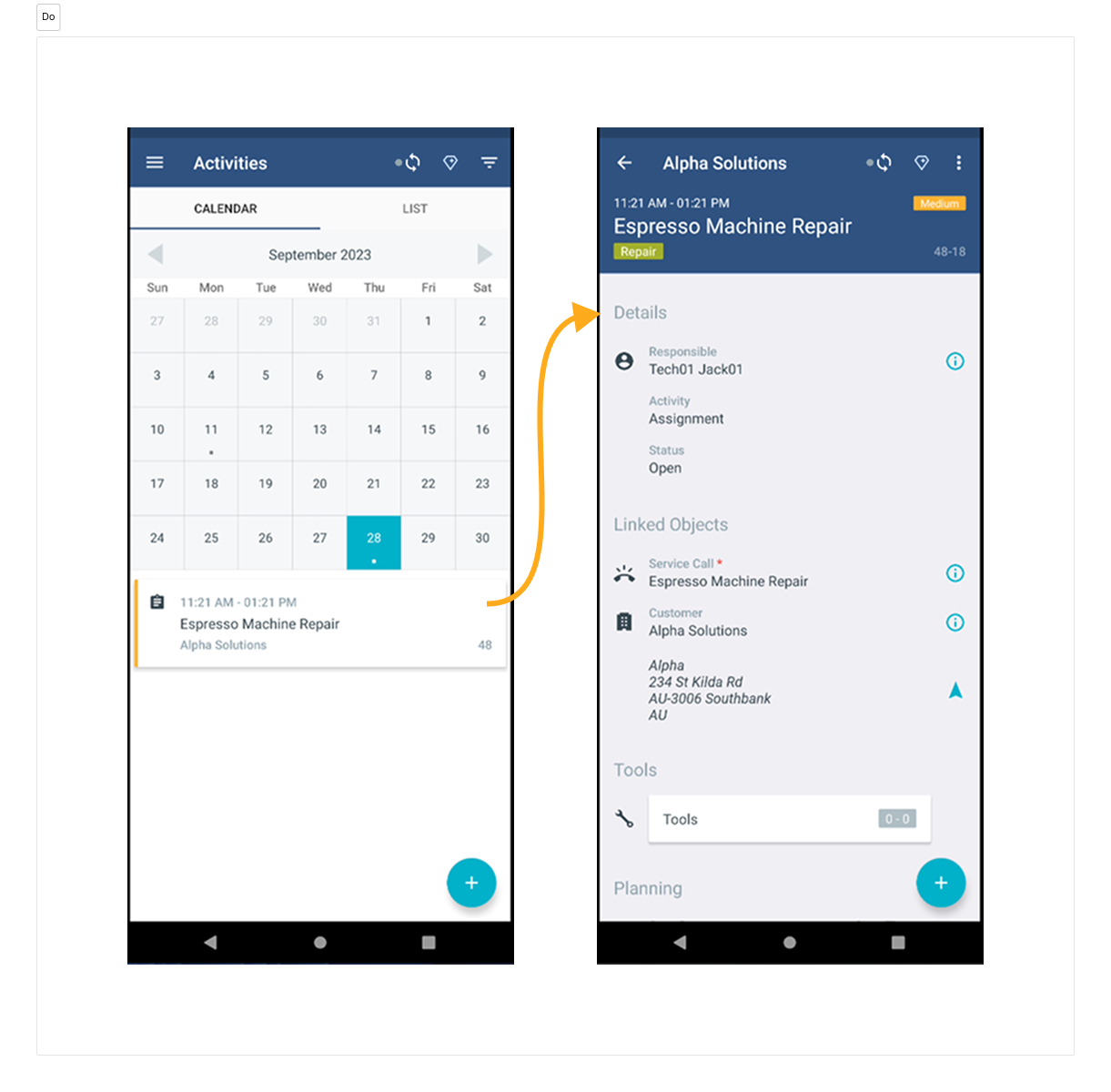
Flow 1 — Calendar → Job details → Accept

The technician opens the Planning Calendar and sees upcoming jobs with time windows, asset name/ID, sit and priority. Tapping a slot opens a job details (Object Page) with an Overview header (title, time window, status, work type). Choosing Accept from the menu job opens a confirmation dialog: “You’re accepting ‘title’ for ‘time window’,” with a simple tools/parts checklist and Confirm & add to calendar. On confirm, a success toast appears. The calendar updates the slot to Accepted with a link to open the pre-arrival brief.
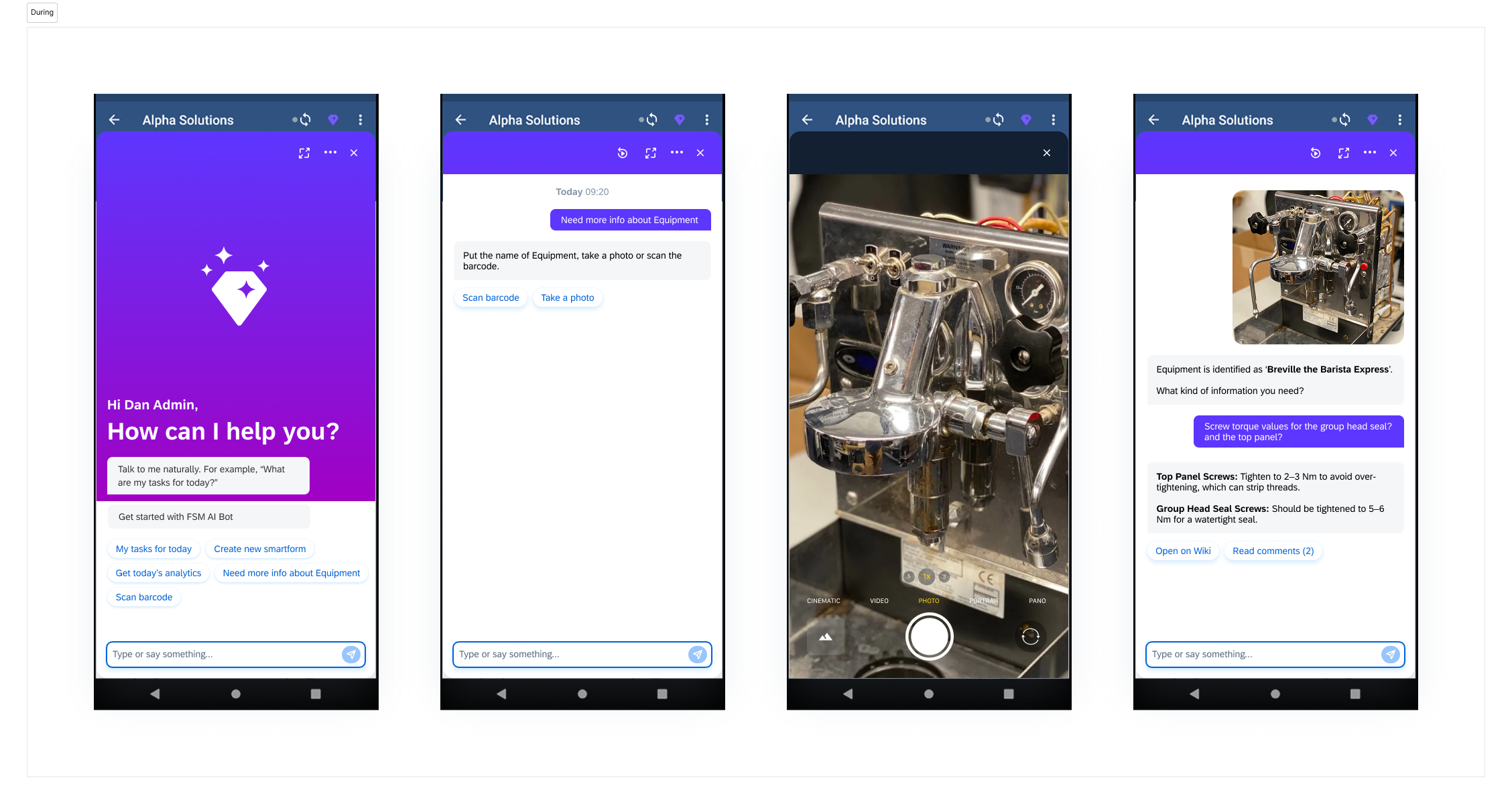
Flow 2: On site → Job details → AI assistant

The technician arrives, opens the app, and lands on the Job Details. From the details screen they launch the AI assistant and snap a photo of the coffee machine. The assistant identifies it precisely—“Breville the Barista Express…”. A quick Q&A follows to narrow symptoms (Examples: “Do you see pressure drop?”, “Boiler temp?”, “Pump noise present?”), with one-tap mini tests.


As answers come in, the assistant converges on a likely cause and offers a safe manual path if confidence stays low. At the end, a Close-Out Summary is prefilled (parts used, time, tests, photos, signatures). The tech reviews everything in Review & Apply, tweaks or undoes any line, and submits to SAP.
Flow 2 — On site → Job details → AI assistant

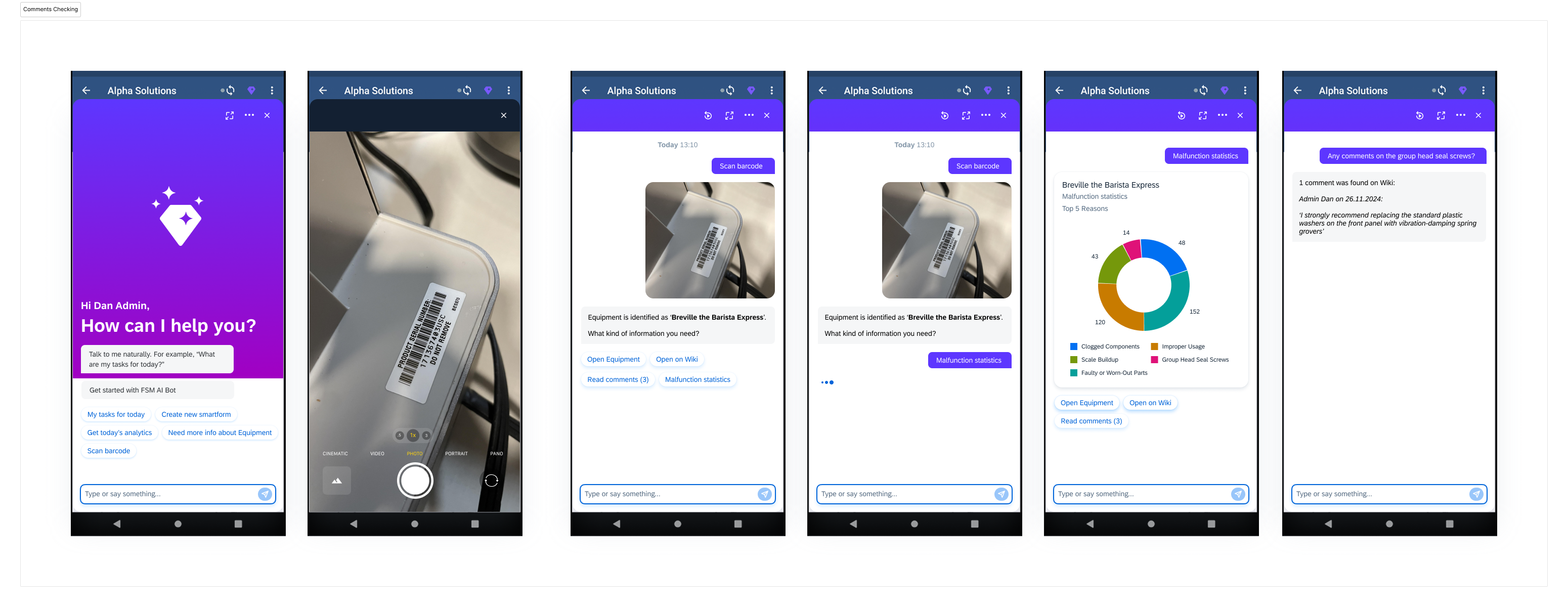
A different technician opens the job and, instead of taking a photo, taps Scan barcode/QR. The app reads the asset tag and the AI immediately resolves the exact model/config (“Breville the Barista Express…”). The tech then asks, “Show me stats for this model,” and the assistant renders a compact Stats panel: top recurring faults for this model/site, average time-to-diagnosis and first-time-fix rate.


All stats are compiled from prior close-outs, step results, and feedback, respecting role permissions; sensitive notes are masked but count toward aggregates.

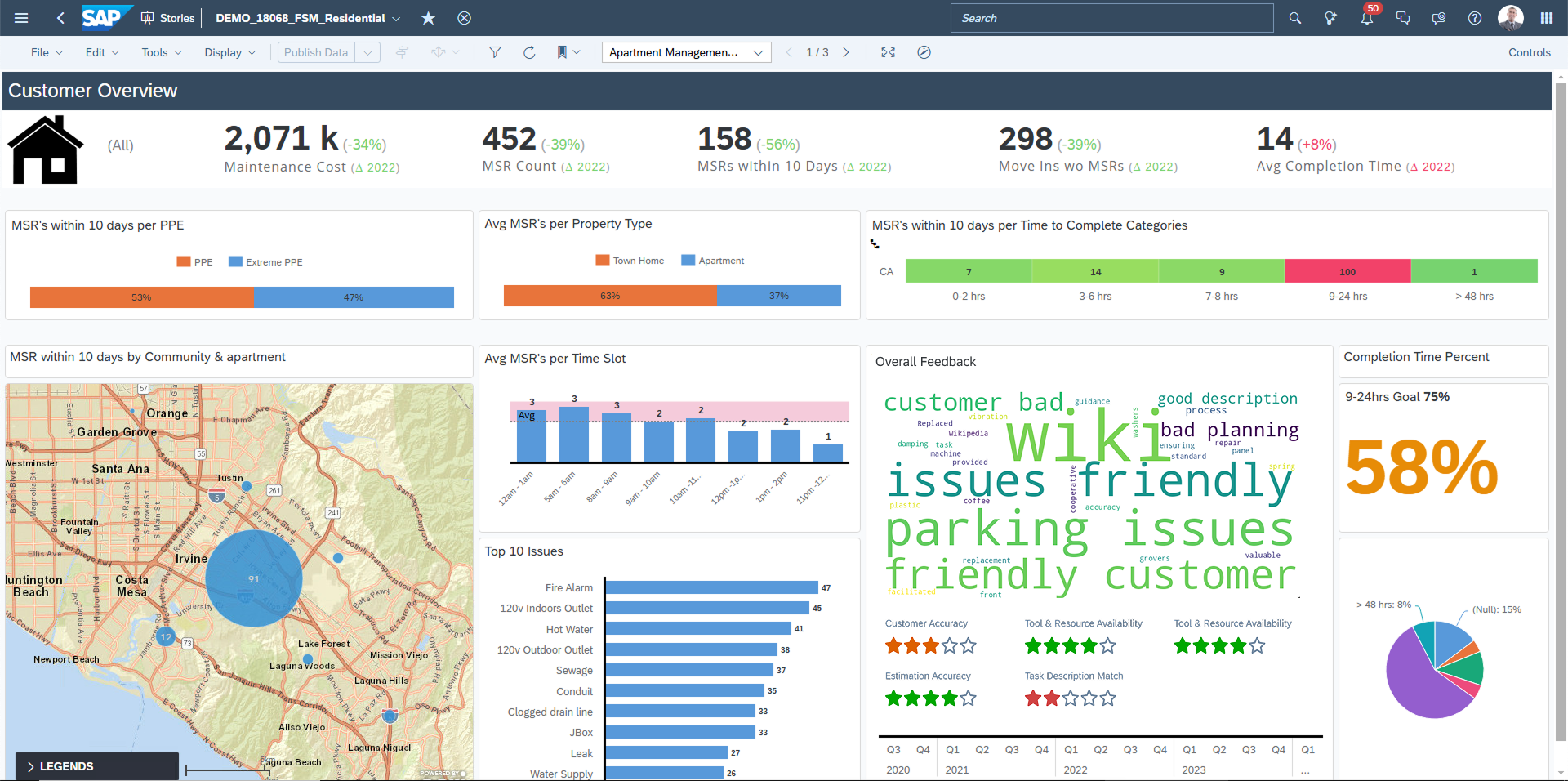
Desktop: SAP Fiori Overview Page: Model Insights

On the SAP Fiori Overview Page (desktop), the technician or supervisor sees a large Model Insights card pinned on the home sector.

Validation

We kept validation simple and real. We built the minimum believable Fiori flows, and tested them with real technicians on real devices. Each loop focused on decision clarity (can they see why the AI says this?), control (can they safely override/undo?), and completion (does the UI capture what happened without extra work?). We iterated copy, evidence layout, and step branching between sessions, proving that the experience is both usable in the field and safe to scale.

Design-only checklist for validation

  • Decision clarity: Evidence + confidence visible in ≤2 taps.
  • Actionability: Obvious next step and safe alternate path.
  • Human-in-control: Review & Apply for changes, with Undo.
  • Safety gates: Mandatory checklist before risky steps (no bypass).
  • Offline resilience: Full flow works offline; queued actions are clear.
  • Logging by design: Close-out prefilled from actions; missing items flagged.
  • Field ergonomics: One-hand use, large targets, high contrast.
  • Error recovery: Clear paths for bad photos, conflicting sensors, wrong asset.

Case Summary

the PoC demonstrates a safe, scalable path to reduce time-to-diagnosis and improve first-time-fix—using patterns, data, and governance customers already trust in SAP.What’s next: expand asset coverage and telemetry, add multilingual/voice, and pilot across more sites—keeping the same trust, safety, and audit guardrails as we scale.

SAP AI + SAP Fiori Design System, POC

AI-Powered Field Support

This project was developed as a Proof of Concept to explore how SAP AI could support field technicians in diagnosing and repairing equipment. The design applied SAP Fiori Design System principles to ensure usability, consistency, and scalability within the SAP ecosystem.

Type

Internal POC

My Role

Product Designer:

Scope framing, flows, IA, wireframes → high-fidelity Fiori UI, prompt/UX for AI, validation plan, and demo build guidance.

Goals

  • Shorten time-to-diagnosis
  • Improve first-time-fix rate
  • Reduce onboarding/training costs
  • Build user trust in AI recommendations
  • Ensure full traceability inside SAP

Users

  • Field Technicians
  • Supervisers
  • Service Managers

Solution Overview

AI-Driven Diagnostics

  • Capture symptoms (typed, voice, photo), auto-enrich with asset metadata from SAP.
  • AI proposes likely faults with confidence, evidence (similar cases, telemetry), and next steps.

Guided Repair (Step-by-Step)

  • Clear, safety-first checklists with Fiori Object Page and Wizard patterns.
  • Inline media (diagrams, short clips) and tool/part references from the SAP asset record.
  • Branching steps adapt based on live outcomes (“Did test pass?” → next step).

Analytics & Knowledge Loop

  • Task history feeds dashboards: repeat issues, MTTR trends, parts usage.
  • Signals retrain the AI - improving future recommendations.

Key User Flows

Before introducing AI, field workers had to manually search through long repair manuals, often escalating to senior colleagues. This resulted in delays and high training costs. By integrating AI, the process was reduced with guided instructions and automated logging - speeding up task completion and boosting user confidence.

The old process took an average of 40 minutes and often required escalation, increasing downtime and training costs. With the AI-powered flow, task can drop to 15 minutes, training costs decreases by ~40%, and downtime per incident reduces by up to 75%

AI UX: Control, Safety, and Trust

Human-in-control

AI should never auto-opens work orders, purchases parts, or changes asset config. Review & Apply screen summarizes changes: steps to perform, parts to log, hours to post.

Safety-first defaults

Safety gates before risky actions; LOTO checks must be acknowledged. If sensor data conflicts with steps, we block and suggest supervisor escalation.

Clear, measurable language

Verb-first steps with pass/fail criteria and tools required.

Accountability & auditability

Log inputs, model version, evidence snapshot, and who did what (AI vs. user vs. supervisor).

Design Principles

We needed a field tool that is usable on mobile, native to SAP workflows, and governance-ready (audit, security, data residency). Fiori + Joule let us ship faster with fewer integration risks.

Clarity cver Complexity

SAP AI generates raw technical outputs. Using SAP Fiori design patterns, we translated them into clear insights, visual alerts, and plain-language recommendations, so even non-technical field workers could take action confidently.

Step-by-Step Guidance

Rather than surfacing long SAP diagnostic reports, we created guided workflows (scan → identify issue → repair → confirm). This matches Fiori’s principle of “role-based, task-driven design”, helping workers focus only on the current step.

Confidence-Building

SAP AI predictions can feel abstract. To build trust, we applied Fiori UI standards for confirmation dialogs, override options, and transparent feedback — ensuring users remained in control while still benefiting from AI support.

Field-Friendly Usability

Field conditions are tough: gloves, noise, poor connectivity. We followed Fiori’s “simple, responsive, coherent”design philosophy by using:

  • Large touch targets,
  • High-contrast UI,
  • Offline-first interactions, so the tool remained usable in real environments.

Scalability within SAP Ecosystem

By aligning with SAP Fiori’s design system and SAP AI APIs, the tool could scale across ERP workflows - automatically syncing repair logs, cost tracking, and training dashboards within the SAP ecosystem.

Why Joule for AI

I selected SAP Joule for AI because it’s grounded in the same governed data - assets, work orders, parts, telemetry - so answers are relevant and auditable. Security, role scopes, and provenance live inside SAP, which simplifies compliance and lets us show evidence, confidence, and “who did what” without bolting on extra policy.

Mock-ups

Flow 1 — Calendar → Job details → Accept

The technician opens the Planning Calendar and sees upcoming jobs with time windows, asset name/ID, sit and priority. Tapping a slot opens a job details (Object Page) with an Overview header (title, time window, status, work type). Choosing Accept from the menu job opens a confirmation dialog: “You’re accepting ‘title’ for ‘time window’,” with a simple tools/parts checklist and Confirm & add to calendar. On confirm, a success toast appears. The calendar updates the slot to Accepted with a link to open the pre-arrival brief.

Flow 2: On site → Job details → AI assistant

The technician arrives, opens the app, and lands on the Job Details. From the details screen they launch the AI assistant and snap a photo of the coffee machine. The assistant identifies it precisely—“Breville the Barista Express…”. A quick Q&A follows to narrow symptoms (Examples: “Do you see pressure drop?”, “Boiler temp?”, “Pump noise present?”), with one-tap mini tests.


As answers come in, the assistant converges on a likely cause and offers a safe manual path if confidence stays low. At the end, a Close-Out Summary is prefilled (parts used, time, tests, photos, signatures). The tech reviews everything in Review & Apply, tweaks or undoes any line, and submits to SAP.
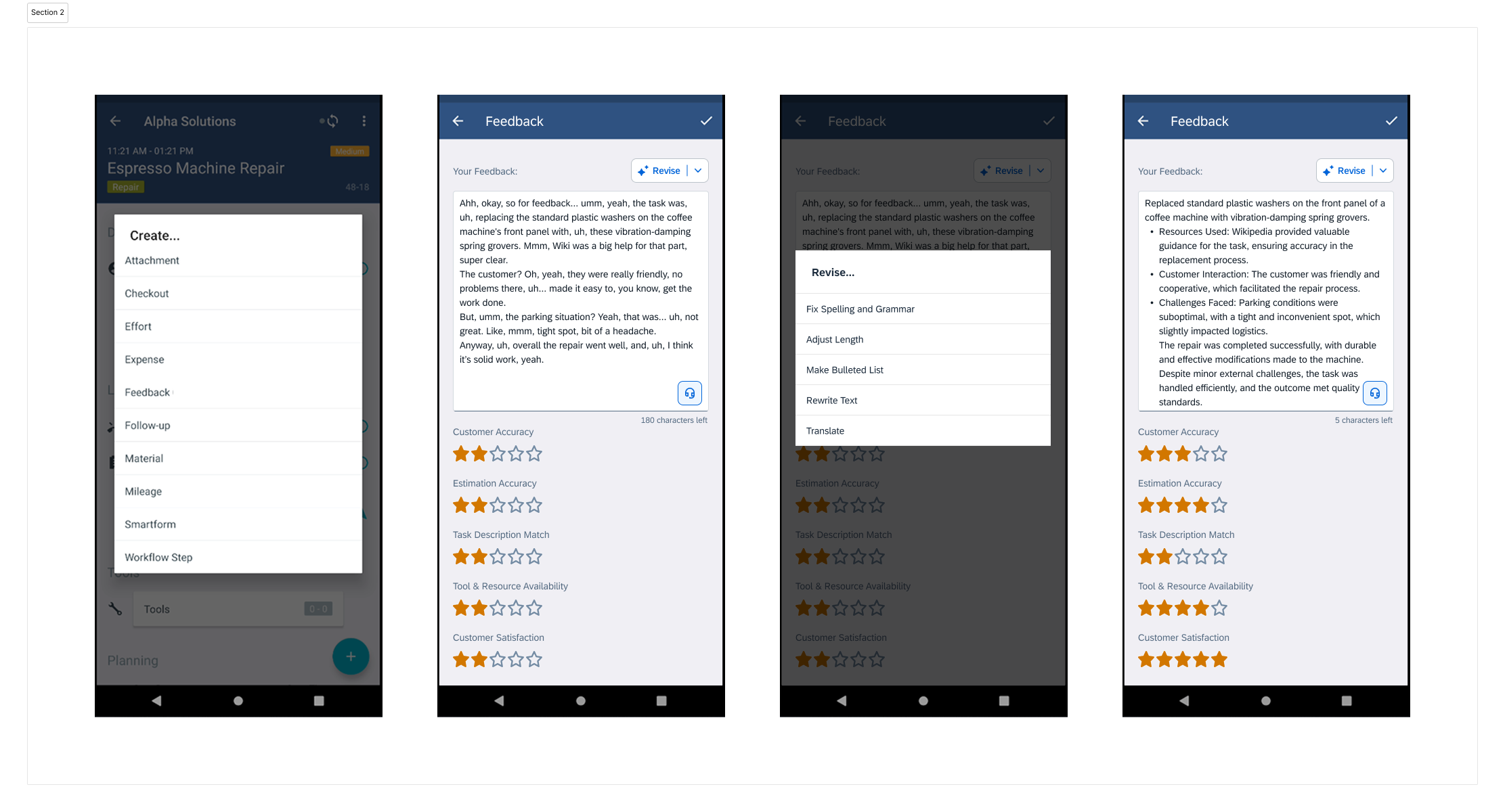
Flow 3: Identify by barcode → request stats

A different technician opens the job and, instead of taking a photo, taps Scan barcode/QR. The app reads the asset tag and the AI immediately resolves the exact model/config (“Breville the Barista Express…”). The tech then asks, “Show me stats for this model,” and the assistant renders a compact Stats panel: top recurring faults for this model/site, average time-to-diagnosis and first-time-fix rate.


All stats are compiled from prior close-outs, step results, and feedback, respecting role permissions; sensitive notes are masked but count toward aggregates.
Desktop: SAP Fiori Overview Page: Model Insights

On the SAP Fiori Overview Page (desktop), the technician or supervisor sees a large Model Insights card pinned on the home sector.
Validation

We kept validation simple and real. We built the minimum believable Fiori flows, and tested them with real technicians on real devices. Each loop focused on decision clarity (can they see why the AI says this?), control (can they safely override/undo?), and completion (does the UI capture what happened without extra work?). We iterated copy, evidence layout, and step branching between sessions, proving that the experience is both usable in the field and safe to scale.

Design-only checklist for validation

  • Decision clarity: Evidence + confidence visible in ≤2 taps.
  • Actionability: Obvious next step and safe alternate path.
  • Human-in-control: Review & Apply for changes, with Undo.
  • Safety gates: Mandatory checklist before risky steps (no bypass).
  • Offline resilience: Full flow works offline; queued actions are clear.
  • Logging by design: Close-out prefilled from actions; missing items flagged.
  • Field ergonomics: One-hand use, large targets, high contrast.
  • Error recovery: Clear paths for bad photos, conflicting sensors, wrong asset.

Case Summary

the PoC demonstrates a safe, scalable path to reduce time-to-diagnosis and improve first-time-fix—using patterns, data, and governance customers already trust in SAP.What’s next: expand asset coverage and telemetry, add multilingual/voice, and pilot across more sites—keeping the same trust, safety, and audit guardrails as we scale.
SAP AI + SAP Fiori Design System, POC

AI-Powered Field Support

This project was developed as a Proof of Concept to explore how SAP AI could support field technicians in diagnosing and repairing equipment. The design applied SAP Fiori Design System principles to ensure usability, consistency, and scalability within the SAP ecosystem.

Type

Internal POC

My Role

Product Designer:

Scope framing, flows, IA, wireframes → high-fidelity Fiori UI, prompt/UX for AI, validation plan, and demo build guidance.

Goals

  • Shorten time-to-diagnosis
  • Improve first-time-fix rate
  • Reduce onboarding/training costs
  • Build user trust in AI recommendations
  • Ensure full traceability inside SAP

Users

  • Field Technicians
  • Supervisers
  • Service Managers

Solution Overview

AI-Driven Diagnostics

  • Capture symptoms (typed, voice, photo), auto-enrich with asset metadata from SAP.
  • AI proposes likely faults with confidence, evidence (similar cases, telemetry), and next steps.

Guided Repair (Step-by-Step)

  • Clear, safety-first checklists with Fiori Object Page and Wizard patterns.
  • Inline media (diagrams, short clips) and tool/part references from the SAP asset record.
  • Branching steps adapt based on live outcomes (“Did test pass?” → next step).

Analytics & Knowledge Loop

  • Task history feeds dashboards: repeat issues, MTTR trends, parts usage.
  • Signals retrain the AI - improving future recommendations.

Key User Flows

Before introducing AI, field workers had to manually search through long repair manuals, often escalating to senior colleagues. This resulted in delays and high training costs. By integrating AI, the process was reduced with guided instructions and automated logging - speeding up task completion and boosting user confidence.

The old process took an average of 40 minutes and often required escalation, increasing downtime and training costs. With the AI-powered flow, task can drop to 15 minutes, training costs decreases by ~40%, and downtime per incident reduces by up to 75%

AI UX: Control, Safety, and Trust

Human-in-control

AI should never auto-opens work orders, purchases parts, or changes asset config. Review & Apply screen summarizes changes: steps to perform, parts to log, hours to post.

Safety-first defaults

Safety gates before risky actions; LOTO checks must be acknowledged. If sensor data conflicts with steps, we block and suggest supervisor escalation.

Clear, measurable language

Verb-first steps with pass/fail criteria and tools required.

Accountability & auditability

Log inputs, model version, evidence snapshot, and who did what (AI vs. user vs. supervisor).

Design Principles

We needed a field tool that is usable on mobile, native to SAP workflows, and governance-ready (audit, security, data residency). Fiori + Joule let us ship faster with fewer integration risks.

Clarity cver Complexity

SAP AI generates raw technical outputs. Using SAP Fiori design patterns, we translated them into clear insights, visual alerts, and plain-language recommendations, so even non-technical field workers could take action confidently.

Step-by-Step Guidance

Rather than surfacing long SAP diagnostic reports, we created guided workflows (scan → identify issue → repair → confirm). This matches Fiori’s principle of “role-based, task-driven design”, helping workers focus only on the current step.

Confidence-Building

SAP AI predictions can feel abstract. To build trust, we applied Fiori UI standards for confirmation dialogs, override options, and transparent feedback — ensuring users remained in control while still benefiting from AI support.

Field-Friendly Usability

Field conditions are tough: gloves, noise, poor connectivity. We followed Fiori’s “simple, responsive, coherent”design philosophy by using:

  • Large touch targets,
  • High-contrast UI,
  • Offline-first interactions, so the tool remained usable in real environments.

Scalability within SAP Ecosystem

By aligning with SAP Fiori’s design system and SAP AI APIs, the tool could scale across ERP workflows - automatically syncing repair logs, cost tracking, and training dashboards within the SAP ecosystem.

Why Joule for AI

I selected SAP Joule for AI because it’s grounded in the same governed data - assets, work orders, parts, telemetry - so answers are relevant and auditable. Security, role scopes, and provenance live inside SAP, which simplifies compliance and lets us show evidence, confidence, and “who did what” without bolting on extra policy.

Mock-ups

Flow 1: Calendar → Job details → Accept

The technician opens the Planning Calendar and sees upcoming jobs with time windows, asset name/ID, sit and priority. Tapping a slot opens a job details (Object Page) with an Overview header (title, time window, status, work type). Choosing Accept from the menu job opens a confirmation dialog: “You’re accepting ‘title’ for ‘time window’,” with a simple tools/parts checklist and Confirm & add to calendar. On confirm, a success toast appears. The calendar updates the slot to Accepted with a link to open the pre-arrival brief.

Flow 2: On site → Job details → AI assistant

The technician arrives, opens the app, and lands on the Job Details. From the details screen they launch the AI assistant and snap a photo of the coffee machine. The assistant identifies it precisely—“Breville the Barista Express…”. A quick Q&A follows to narrow symptoms (Examples: “Do you see pressure drop?”, “Boiler temp?”, “Pump noise present?”), with one-tap mini tests.


As answers come in, the assistant converges on a likely cause and offers a safe manual path if confidence stays low. At the end, a Close-Out Summary is prefilled (parts used, time, tests, photos, signatures). The tech reviews everything in Review & Apply, tweaks or undoes any line, and submits to SAP.

Flow 3: Identify by barcode → request stats

A different technician opens the job and, instead of taking a photo, taps Scan barcode/QR. The app reads the asset tag and the AI immediately resolves the exact model/config (“Breville the Barista Express…”). The tech then asks, “Show me stats for this model,” and the assistant renders a compact Stats panel: top recurring faults for this model/site, average time-to-diagnosis and first-time-fix rate.


All stats are compiled from prior close-outs, step results, and feedback, respecting role permissions; sensitive notes are masked but count toward aggregates.

Desktop: SAP Fiori Overview Page: Model Insights

On the SAP Fiori Overview Page (desktop), the technician or supervisor sees a large Model Insights card pinned on the home sector.

Validation

We kept validation simple and real. We built the minimum believable Fiori flows, and tested them with real technicians on real devices. Each loop focused on decision clarity (can they see why the AI says this?), control (can they safely override/undo?), and completion (does the UI capture what happened without extra work?). We iterated copy, evidence layout, and step branching between sessions, proving that the experience is both usable in the field and safe to scale.

Design-only checklist for validation

  • Decision clarity: Evidence + confidence visible in ≤2 taps.
  • Actionability: Obvious next step and safe alternate path.
  • Human-in-control: Review & Apply for changes, with Undo.
  • Safety gates: Mandatory checklist before risky steps (no bypass).
  • Offline resilience: Full flow works offline; queued actions are clear.
  • Logging by design: Close-out prefilled from actions; missing items flagged.
  • Field ergonomics: One-hand use, large targets, high contrast.
  • Error recovery: Clear paths for bad photos, conflicting sensors, wrong asset.

Case Summary

the PoC demonstrates a safe, scalable path to reduce time-to-diagnosis and improve first-time-fix—using patterns, data, and governance customers already trust in SAP.What’s next: expand asset coverage and telemetry, add multilingual/voice, and pilot across more sites—keeping the same trust, safety, and audit guardrails as we scale.